Showing posts with label just-in-case. Show all posts

Friday, March 23, 2012

удаленное соединение: ноу-хау


Use the Net Use command to map or disconnect a drive
You can use the net use command for batch files and scripts. To use the net use command to map or disconnect a drive:
To map a network drive:
Click Start, and then click Run.
In the Open box, type cmd.
Type net use x: \\computer name\share name, where x: is the drive letter you want to assign to the shared resource.

To disconnect a mapped drive:
Click Start, and then click Run.
In the Open box, type cmd.
Type net use x: /delete, where x: is the drive letter of the shared resource.

Sunday, March 18, 2012

про стартапы и лошадок

Душевная статья: 
10 фактов о работе в стартапе в сравнении с работой в большой компании.
Ниже цитаты и чуток собственных мыслей по поводу и без.
...At a startup it’s unavoidable to have lots of responsibility and accountability. There’s no doubt, too, that being at a startup will put you in a position to make a huge impact. If you do amazing work the entire company and all of its customers will benefit from it. And you’ll be loved for it. On the flip side, if you make a big mistake, the whole company pays for it. But keep in mind that most startup cultures prefer agility and speed to cautiousness. It’s likely that your mistake won’t actually get you in trouble, as long as you were trying to do the right thing.
Ну, это понятно - в толпе легче спрятаться.
Одна мысль как бы не по теме. (далее КК = Контроль Качества, QA):
Стартап как вид бизнеса в ИТ - это всего навсего проверка концепции на жизнеспособность.
Стартапу КК не нужен. Более того - стартапу КК противопоказан.
Это потеря темпов и нецелевая трата заложенных в стартап и без того ограниченных средств.
С точки зрения бизнес-системы, вопрос качества в стартапе эффективнее решать другими способами. Например: no-bug development + continuous integration.

Sunday, October 23, 2011

Thursday, October 13, 2011

ускоряем пинг

надоело окрывать кмд, писать пинг и вообще...

берем этот код в текстовый файл и меняем на .vbs

strComputers = "192.168.98.5,LA1DVCONSVR001,jenkins.d3nw.net" 'use comma: "192.168.98.5,192.168.98.6"
arrComputers = SPLIT(strComputers, ",")
for each strComputer in arrComputers
 set objPing = GetObject("winmgmts:{impersonationLevel=impersonate}")._
        ExecQuery("select * from Win32_PingStatus where address = '" & _
            strComputer & "'")
 for each objPingStatus in objPing
        if ISNULL(objPingStatus.StatusCode) or objPingStatus.StatusCode<>0 then
 if strFailedPings <> "" then strFailedPings = strFailedPings & vbcrlf
 strFailedPings = strFailedPings & strComputer
        end if
    next
next
if strFailedPings = "" then
    strOK = "Ping status of specified computers is OK:" & vbcrlf
    for each strComputer in arrComputers
       strOK = strOK & strComputer & vbcrlf
    next
 wscript.echo strOK
else
 wscript.echo "Ping failed for the following computers:" & _
 vbcrlf & vbcrlf & strFailedPings
end if

Wednesday, October 12, 2011

вдруг пригодится: sql для крутых

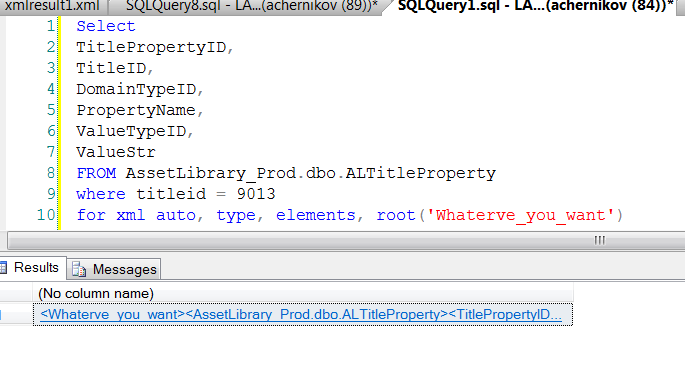
добавив одну строчку в самом конце sql запроса, вы можете получить результат в виде xml, а не в виде обычной таблицы:
For XML Auto, Type, Elements, Root('Whatever_you_want')


вдруг пригодится...

ну, а под катом - уж для совсем крутых...