Showing posts with label tips. Show all posts

Tuesday, March 27, 2012

нативный браузер для андроида как платформа для апликаций

очень интересный подход к программированию для андроида:
http://www.codeproject.com/Articles/353661/Writing-Android-Programs-with-HTML-and-JavaScript


вообще на их сайте интересные вещи есть:
http://togosoft.com/index.php

  • работа с андроидным девайсом через jscript
  • интересные апликации для андроида
  • jscript  библиотеки для некоторых гугловский сервисов (графики, карты, геолокация, бар-код)
картинка, конечно, ужасная.

Friday, March 23, 2012

удаленное соединение: ноу-хау


Use the Net Use command to map or disconnect a drive
You can use the net use command for batch files and scripts. To use the net use command to map or disconnect a drive:
To map a network drive:
Click Start, and then click Run.
In the Open box, type cmd.
Type net use x: \\computer name\share name, where x: is the drive letter you want to assign to the shared resource.

To disconnect a mapped drive:
Click Start, and then click Run.
In the Open box, type cmd.
Type net use x: /delete, where x: is the drive letter of the shared resource.

Thursday, December 22, 2011

NEVER TAKE ON WORK AT A LOSS FOR THE PROSPECT OF LATER FAIRLY PAID WORK.

http://www.weareblink.com/design-resources/simple-honest-funny-advice-on-design-pricing-methods/

Sunday, November 27, 2011

в продолжение еще одного разговора


под катом еще кое-что...

Sunday, October 23, 2011

Thursday, October 13, 2011

ускоряем пинг

надоело окрывать кмд, писать пинг и вообще...

берем этот код в текстовый файл и меняем на .vbs

strComputers = "192.168.98.5,LA1DVCONSVR001,jenkins.d3nw.net" 'use comma: "192.168.98.5,192.168.98.6"
arrComputers = SPLIT(strComputers, ",")
for each strComputer in arrComputers
 set objPing = GetObject("winmgmts:{impersonationLevel=impersonate}")._
        ExecQuery("select * from Win32_PingStatus where address = '" & _
            strComputer & "'")
 for each objPingStatus in objPing
        if ISNULL(objPingStatus.StatusCode) or objPingStatus.StatusCode<>0 then
 if strFailedPings <> "" then strFailedPings = strFailedPings & vbcrlf
 strFailedPings = strFailedPings & strComputer
        end if
    next
next
if strFailedPings = "" then
    strOK = "Ping status of specified computers is OK:" & vbcrlf
    for each strComputer in arrComputers
       strOK = strOK & strComputer & vbcrlf
    next
 wscript.echo strOK
else
 wscript.echo "Ping failed for the following computers:" & _
 vbcrlf & vbcrlf & strFailedPings
end if

Wednesday, October 12, 2011

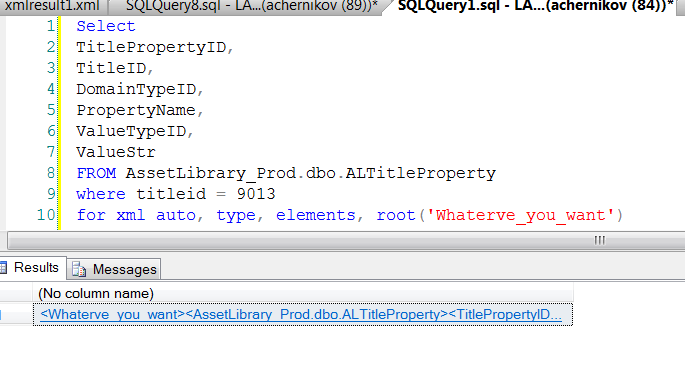
вдруг пригодится: sql для крутых

добавив одну строчку в самом конце sql запроса, вы можете получить результат в виде xml, а не в виде обычной таблицы:
For XML Auto, Type, Elements, Root('Whatever_you_want')


вдруг пригодится...

ну, а под катом - уж для совсем крутых...

Thursday, October 6, 2011

графики

http://code.google.com/apis/chart/image/


уровень
и ссылочка на плохонькую статейку для asp.net под катом.

две иконки

новая иконка: выключить комп:
%windir%\system32\shutdown.exe -s -t 00

перезагрузка:
%windir%\system32\shutdown.exe -r -t 00


интересные места

http://www.wikihow.com


контрольная панель для настоящих пацанов

да хоть на рабочем столе:
новая папка, наименовать вот так:
XXX.{ED7BA470-8E54-465E-825C-99712043E01C}

все до точки - на усмотрение.

красота.

excel/access nice blog

http://xlspot.com/blog


Categories

Monday, September 12, 2011

что такое синхронно и что такое асинхронно


When you execute something synchronously, you wait for it to finish before moving on to another task. When you execute something asynchronously, you can move on to another task before it finishes.
That being, said, in the context of computers this translates into executing a process or task on another "thread." A thread is a series of commands--a block of code--that exists as a unit of work. The operating system can manage multiple threads and assign a thread a piece ("slice") of processor time before switching to another thread to give it a turn to do some work. At its core (pardon the pun), a processor can simply execute a command--it has no concept of doing two things at one time. The operating system simulates this by allocating slices of time to different threads.
Now, if you introduce multiple cores/processors into the mix, then things CAN actually happen at the same time. The operating system can allocate time to one thread on the first processor, then allocate the same block of time to another thread on a different processor.
All of this is about allowing the operating system to manage the completion of your task while you can go on in your code and do other things. Asynchronous programming is a complicated topic because of the semantics of how things tie together when you can do them at the same time...


Sunday, August 21, 2011

Глобализм и Образование
Как русскому студенту прослушать курсы лекций звезд Стенфорда, Беркли и Йеля.


Возможно вы знаете, что не обязательно платить 50 тысяч долларoв в год чтобы прослушатъ курсы звезд MIT или Стенфорда? Стартовые страницы к систематическим курсам тут, или тут, или тут (много курсов истории, языков, и т.п.) отсылают в сайтам соответствующих Университетов. Среди них MIT (пионер этого дела), Berkeley, Stanford, Yale, Notre Dame, NYU, University of Washington. Курсы адресованы студентов всех уровней, от старшеклассников и первокурсников до аспирантов, их читают известные ученые, например, легендарный Gilbert Strang. Кстати, полулярные видео лекции лучших ученых мира тоже висят в Интернете.

Эти видеокурсы, учебники с emule и торрентов плюс Wiki позволяют умным и мотивированным ребятам получить все лучшее и современное, дома, бесплатно. Валить не обязательно. Подумайте, еще 10 лет назад никому было невозможно прослушать сразу двух лекторов разных Университетов. Утверждалось, что большинство стран навсегда отрезаны от передовой науки из–за неподъемных цен на Университеты и учебники. И вот проблема начала решаться, без Сколково и Фурсенко.

Я очень рекомендую видеокурсы студентам (смотреть параллельно своим курсам), преподавателям (теперь вы nolens volens с ними конкурируете), аспирантам, специалистам и любителям. Пожалуйста, оповестите своих коллег и знакомых студентов и присоединяйтесь сами. Не осталось причин для неученой тьмы.

максимальная длина url


WWW FAQs: What is the maximum length of a URL?


Although the specification of the HTTP protocol does not specify any maximum length, practical limits are imposed by web browser and server software.


Microsoft Internet Explorer (Browser)
Microsoft states that the maximum length of a URL in Internet Explorer is 2,083 characters, with no more than 2,048 characters in the path portion of the URL. In my tests, attempts to use URLs longer than this produced a clear error message in Internet Explorer.


Firefox (Browser) 
After 65,536 characters, the location bar no longer displays the URL in Windows Firefox 1.5.x. However, longer URLs will work. I stopped testing after 100,000 characters.


Safari (Browser)
At least 80,000 characters will work. I stopped testing after 80,000 characters.
Opera (Browser)At least 190,000 characters will work. I stopped testing after 190,000 characters. Opera 9 for Windows continued to display a fully editable, copyable and pasteable URL in the location bar even at 190,000 characters.


Apache (Server)
My early attempts to measure the maximum URL length in web browsers bumped into a server URL length limit of approximately 4,000 characters, after which Apache produces a "413 Entity Too Large" error. I used the current up to date Apache build found in Red Hat Enterprise Linux 4. The official Apache documentation only mentions an 8,192-byte limit on an individual field in a request.


Microsoft Internet Information Server
The default limit is 16,384 characters (yes, Microsoft's web server accepts longer URLs than Microsoft's web browser). This is configurable.


Saturday, August 20, 2011

кнопка windows в win7

win+LeftArrow and win+RightArrow (особенно хороши с двумя экранами!)
win+UpArrow and Win+DownArrow
win+Shift+LeftArrow and win+Shift+LeftArrow
win+Shift+UpArrow and win+Shift+DownArrow

win+p (displayswitch.exe)

win+x

win+Home (back: win+Home)

Open Command Prompt here

c:\windows\globalization\mct (all backgrounds)

blackbox recorder: psr.exe

win+1 and so on.

win+t (back: win+Shift+t)

win+Space

win+e my comp
win+r run
win+s snap to onenote
win+d desktop
win+f find
win+L lock comp
win+b  notification icons
win+n one note
win+m minimize (same as win+d)


Wednesday, August 17, 2011


Monday, August 15, 2011

http://blogs.msdn.com/b/tims/archive/2009/01/12/the-bumper-list-of-windows-7-secrets.aspx